
Peak Stocks3.2.22 - Google Play
You'll be able to see results in few seconds.
Publisher Description
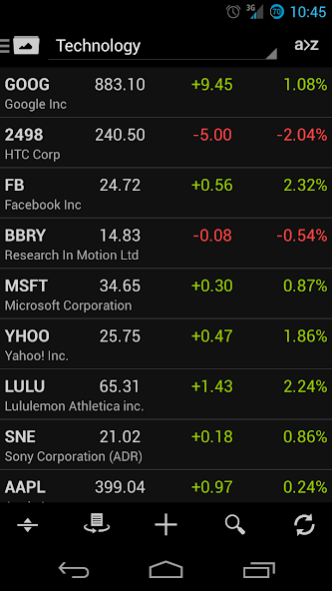

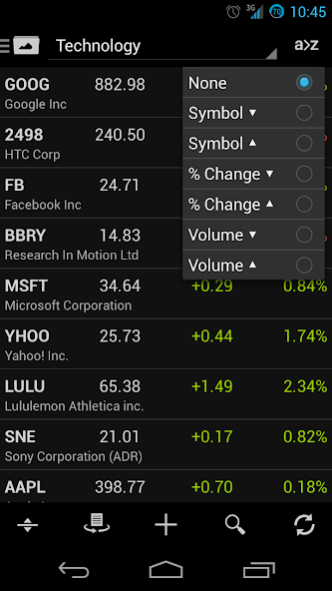

Our goal is to provide you with the most elegant, feature rich, intuitive, and easy to use stock market quote and portfolio management utility on the Android platform. Peak Stocks is specifically designed for Android with the latest design patterns in mind. Doing so allows us to tightly integrate our app into the Android operating system for maximum performance and user satisfaction.
Peak Stocks Features:
- Google Finance integration. Sync and manage your portfolios across your multiple devices and the web.
- Real time and after hour quotes without the need to navigate to new screens. Stream quotes, automatically, as often as every 5 seconds.
- Create multiple watch lists/portfolios. Easily scroll through portfolios by swiping left or right.
- Easily edit stocks by long pressing on a stock to display an options menu.
- Search suggestions to find the stocks you're looking for.
- Sort stocks by symbol, percentage gain, dollar gain, and price in ascending or descending order.
- Drag and drop stocks to perform a custom order.
- Up to date stock news directly from Google Finance. Articles are marked read after reading.
- Twitter news feeds.
- Company events. Tap on an active event to add to your Google calendar.
- Detailed stock information such as market cap, PE ratio, and dividend.
- Touch interactive charts.
- Separate tablet and handset app layouts.
- Light and Dark themes.
- Stock price alerts.
- Single stock or portfolio widgets.
- Look and feel of Jelly Bean.
Features are constantly being developed. Feedback and requests are greatly appreciated.
About Peak Stocks
The company that develops Peak Stocks is Kristof Dziemianczyk. The latest version released by its developer is 3.2.22.
To install Peak Stocks on your Android device, just click the green Continue To App button above to start the installation process. The app is listed on our website since 2018-02-01 and was downloaded 0 times. We have already checked if the download link is safe, however for your own protection we recommend that you scan the downloaded app with your antivirus. Your antivirus may detect the Peak Stocks as malware as malware if the download link to com.KWD.PeakFinance is broken.
How to install Peak Stocks on your Android device:
- Click on the Continue To App button on our website. This will redirect you to Google Play.
- Once the Peak Stocks is shown in the Google Play listing of your Android device, you can start its download and installation. Tap on the Install button located below the search bar and to the right of the app icon.
- A pop-up window with the permissions required by Peak Stocks will be shown. Click on Accept to continue the process.
- Peak Stocks will be downloaded onto your device, displaying a progress. Once the download completes, the installation will start and you'll get a notification after the installation is finished.
Program Details
System requirements
Download information
Pricing
Version History
version 3.2.22
posted on 2018-02-01
Fixed quotes, news, charts.
Added deprecation message.
version 3.2.11
posted on 2016-02-25
Fixed app not loading data.,Enabled widgets for non premium customers.
version 3.0.7
posted on 2013-06-28
Several fixes and updates
Disclaimer
Official Google Play Link
We do not host Peak Stocks on our servers. We did not scan it for viruses, adware, spyware or other type of malware. This app is hosted by Google and passed their terms and conditions to be listed there. We recommend caution when installing it.
The Google Play link for Peak Stocks is provided to you by apps112.com without any warranties, representations or guarantees of any kind, so access it at your own risk.
If you have questions regarding this particular app contact the publisher directly. For questions about the functionalities of apps112.com contact us.
